How to Put a Password on a PDF File
Some papers are private, like bills, contracts and ID copies. If you send them by email or chat, someone else may see them. A password can help. This guide shows you how to put a password on a PDF for free.
Step by step
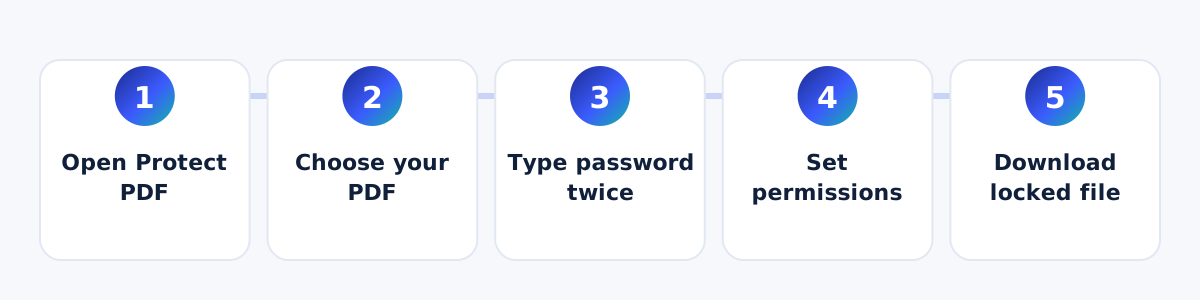
- Open the Protect PDF tool.
- Choose your PDF file.
- Type a password. Type it again to be sure.
- Choose if people may print, copy words or edit the file.
- Press "Protect PDF" and download your locked file.
How to make a good password
- Use at least 10 letters and numbers.
- Do not use your name or birth date.
- Use a mix of big letters, small letters and numbers.
- Do not send the password in the same message as the file. Send it in a call or a different chat.
Please remember
If you forget the password, nobody can bring it back. We cannot reset it. So write it in a safe place. Also, keep your first file without a password in a safe place.
How strong is the lock?
We use AES-256. This is a strong kind of lock that is used by banks and offices. Your file is locked on your own device, so we never see it or the password.
How to open it later
If you want to take the password off a file that is yours, use our Unlock PDF tool. You must know the password.
When should you put a password on a PDF?
- When you email a bank paper, ID copy or contract.
- When you keep a private file on a shared computer or phone.
- When you give a file to someone, and only that person should read it.
What can you control?
Besides the password to open the file, you can choose if people may print it, copy its words or edit it. Many PDF programs follow these choices. But the password is the real lock. So always choose a strong password.
A safe way to share the password
Do not send the password in the same email as the file. If someone gets the email, they get both. Send the password in a phone call, or a different chat app.
Mistakes to avoid
- Do not use a simple password like 1234 or your phone number. These are easy to guess.
- Do not keep the password in a note called "password" on your phone.
- Do not delete your first file before you check that the locked file opens with your password.
- Do not tell the password to people who do not need it.
A few minutes of care can keep your private papers safe.
Questions and answers
Can you get my password back if I forget it?
No. We never see your password, so we cannot get it back.
Is it free?
Yes. It is free and needs no sign-up.
Does the locked file work on phones?
Yes. Most PDF apps on phones ask for the password and then open the file.